Showing posts with label 2D. Show all posts

Sunday, December 11, 2016

Week 16 Figure Drawing Turn In

So I every Friday for the first few weeks of FIEA we had figure drawing class so that we can get a good grasp of human anatomy and some more drawing concepts.

Out of all the great drawings I got to do in there I chose these 3 to show up in this blog.


Tuesday, December 6, 2016

Week 15 Final Delivery (All Material)

For this week we needed to present the work that we have done so far with any updates that we have created for the Wizard of Oz VR experience.

I was tasked to update the leaves texture that will be falling via a sprite generator that Yan created. I also grabbed the layouts that the rest of the team had assembled and updated their layout. Finally I updated my own Tinman concept layout sheet so that it shows the progression of his design.


Tuesday, November 29, 2016

2D Class Week 14 Concept Round (Final Color)

For this week I had the task to develop the Tinman character more and create different color options for the designs. I did three separate ones, one that had some rust coloring on it to suggest that he has been stuck in place for a little bit. The next one was a cleaner version of him just to try out some more different colors, and the last one was a version that makes him look more abandoned and aged as nature has grown over his body and you can see the wear and tear on his body.


I also updated the Layout following the suggestions that our professor Nick gave us by lowering the Title and giving it a layer style so that it glows and also added some leaves on the corners as a style.


Monday, November 21, 2016

2D Class Week 13 Concept Round (Value Pass 02)

For this week, we looked at the designs that were made for the Tinman along with Nick and he gave us some critiques as to what he liked from each one and what to improve. I combined some of the elements from the favorite of the six into the new redesigns and then explored some new ideas and developed the whole design a little further.


I also worked on the layout for the Tinman group according to feedback from our professor.


Tuesday, November 15, 2016

2D Class Week 12 Concept Round (Value Pass 01)

For this week we took a look at all of our designs from last week and grab the strongest of the bunch and condensed them to 6 new designs and also brought in some value work to better describe the shape and details of the character.


I also updated the layout for our team with the help of Bailey and Leah


Monday, November 7, 2016

2D Class Week 11 Concept Round 01 (Thumbnails)

For this week's 2D assignment, our team was tasked to develop the Wizard of Oz Tim Burton's style a little further and create 10 thumbnails of the characters redesigned as well as 10 thumbnails for the environment.

For our team specifically I created 10 thumbnails of the Tinman.


I also made a quick bust like illustration of one possible version of the Tinman.


Sunday, October 30, 2016

2D Class Week 10 Concept Discovery With 3D

This week in 2D class we were experimenting with toon shaders in Maya and we also as a group cleaned up and fixed things that our professor gave us notes on to fix.

I grabbed the Tinman proxy that Boo had made and applied a 3 tone toon shader to it. Then I applied toon lines to it and worked with the profile lines and intersection line attributes in order to give it a designer look and feel.


Boo's Tinman Proxy

Boo's Tinman Proxy

This is the Tinman After I applied the Toon Shader and Toon Lines

This is the Tinman After I applied the Toon Shader and Toon Lines

Afterwards I did some drew over the images to see where we can improve on the character design. I came up with 2 different variations and then Boo came up with a more different variation. We put them next to each other and grabbed whichever piece appealed the most to us.

First attempt at a Draw over

Second attempt at a Draw over

Boo's Draw over

Last attempt at a draw over with all the favorite pieces together
I also did some draw overs of the face tree on the environment side of things. Plus a couple of ideas that I was throwing around for what the face on the tree might look like.

I drew a couple of options for faces for the tree

My first concept of the tree I envisioned 2 branches that would come together to form a heart. The reasoning behind that was that it would serve as a beacon for the Tinman to want to chop it down in search of a heart of his own. 

This was my second go at the face tree and this was actually the design that we decided to go with because the curvature of the trunk is appealing to us and it kind of spreads out at the top more than the original.

Here is a tree, not all designs can be diamonds. 


Tuesday, October 25, 2016

2D Class Week 09 Shape Language

This week our Tinman group got together to really nail down a shape for the Tinman so that he has both appeal and a distinct shape that will set him appart from all the other characters. After that, we made a rough proxy model of him on Maya and threw him on Unreal to see how he looks. We also sat together to get the environment figured out and the set dressing.

Again my team consists of:
Leah Augustine - Team Leader
Boo Roseman
Kay Ghering
Yanjun Chen
Connor Hollis

For this assignment I worked on some quick silhouettes of the Tinman, a quick 2D render of the Tinman and a design for his axe as well as a 3D proxy model.


Wednesday, October 12, 2016

2D Class Week 08 Artist Discovery

This week we split into teams in class to rework The Wizard of Oz using Tim Burton as inspiration for the style. In the team I am in, we are going to be looking at the Tin Man and redesigning him. So in the next few days/weeks we will be doing some research and posting it on the blog. Then we will put it all together with the other teams who have, The Witch (includes the flying monkeys), The Scarecrow, and The Lion.


I gathered some images, put them on pinterest and also did some research into Timburton and Don't Starve

I also researched animation styles and facial animations for the Tinman


My team members are:
-Leah Augustine
-Boo Roseman
-Kay Ghering
-Yanjun Chen
-Connor Hollis

Tuesday, October 11, 2016

2D Class Week 07 Basic Lighting

This week we look into basic three point lighting, we set up a reference photograph image of an object of our choosing and then we go into photoshop and replicate it the best we can.


Tuesday, October 4, 2016

2D Class Week 06 Value

This week we were given a black and white image that was linework only. We were to bring it into photoshop and give it some value with black and white only.


Total time was about 3 hours

Tuesday, September 27, 2016

2D Class Week 05 Silhouettes

For this week's assignment we created Silhouettes of either characters, environment or weapons. I chose to do characters, so I created 9 variations of a warrior type character who often wields a close ranged weapon.
This is the Handout provided by Nick Zuccarello


The total time on this assignment was about 1.5 hours.

Monday, September 19, 2016

2D Class Week 04 Composition and Layout

For this weeks assignment we were tasked with creating a composition illustration using one of the following types of compositions. I chose The L or rectangle composition for my artwork.

Total Time 5 hours


Tuesday, September 13, 2016

2D Class Week 03 (One,Two, Three Perspective)

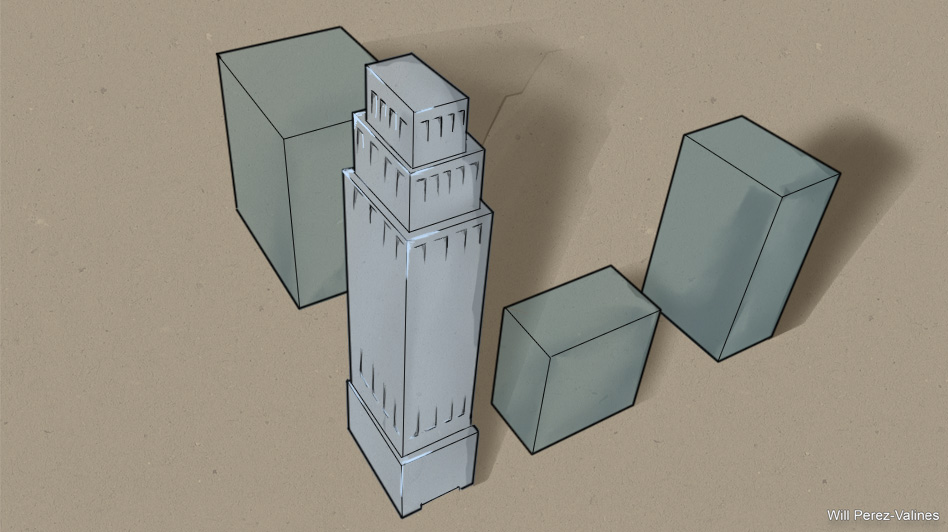
For this week's homework we were to draw in 3 point perspective. I went and looked up some images of buildings from a birds eye view so that I could get a really dynamic look at a building from a 3 point perspective. Below is the example from my professor Nick Zuccarello. Total time was about 2.5 hours.


Monday, September 5, 2016

2D Class Week 02 Basics of Drawing Shapes

In this assignment, I posed 2 mannequins using ZBrush and then I drew them on Photoshop using basic shapes and a couple of preset tools in Photoshop to get the shape and blending that I wanted. I began by using a tool called Sketch With Me, then I used the CottonBall Preset smudge tool to push the value around, then I used a combination of  felt marker med tip preset and the comicbook nib 10 flow preset to get the sharper crisper edges.


Reference